How to keep compliance training current across several LMSs
Keep one approved course in Honen. Deliver it through each LMS's supported path. When a policy changes, revise and approve the Honen course, then test the next launch in every affected LMS. A live package can reduce repeated ZIP uploads, but it does not remove content review or tenant testing. Find each LMS guide.
Name one source of truth
List the documents that control the course: policy, procedure, forms, and effective date. Give an owner to each document. Build the Honen course from approved copies. Record who approves the lesson, warning, and assessment answer. Do not let an AI draft become the final safety or legal instruction without review.
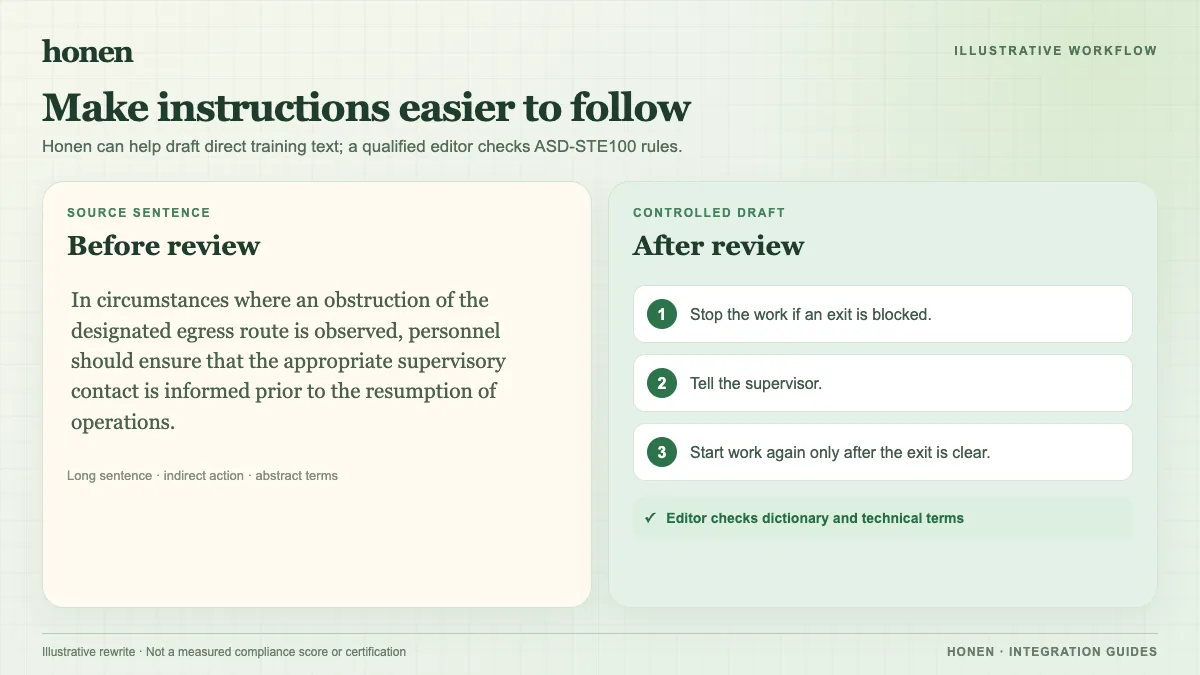
If your organization uses ASD-STE100, ask a qualified editor to check approved words, technical names, sentence rules, and the company glossary. Short, direct sentences help, but style alone cannot prove compliance. Use the official ASD source for the current standard.
Draft toward ASD-STE100 in Honen
An AI draft can save preparation time. It cannot approve safety instructions or show conformity with ASD-STE100 by itself. Use this review flow for every LMS destination:
- Give Honen the approved policy and the exact task the learner must do. Remove expired procedures before drafting.
- Ask for one action in each step. Ask for short, active sentences and one term for each object.
- Compare every instruction with the source. Check numbers, limits, warnings, and pass criteria first.
- Have a trained editor check each word against the ASD-STE100 dictionary and the approved technical terms.
- Have a subject expert run the procedure as written. Revise any step that produces a wrong action.
- Approve the final text. Then export the course to the LMS and test the learner view.
For example, a draft might say, “The valve should be inspected prior to the initiation of the procedure.” A clearer draft says, “Inspect the valve before you start the procedure.” This example shows a direction for editing, not an approved ASD-STE100 sentence. Only the official rules and dictionary can decide that. Keep the approved wording in Honen so every LMS launch uses the same reviewed lesson.
Map every LMS tenant
Make a small table for each destination: LMS name, tenant, package standard, edition, course ID, owner, and completion rule. A tenant may accept SCORM 1.2 but not the same SCORM 2004 edition as another tenant. Some may enable LTI services or cmi5. Compare SCORM, cmi5, xAPI, and LTI before you assume one package fits all.
Publish an update in order
- Change the source document and get approval.
- Revise the Honen lesson and assessment.
- Have the subject expert check facts and answer keys.
- Review the controlled-language text.
- Test the course in Honen.
- Launch it from each LMS as a test learner.
- Confirm completion, pass or fail, score, time, and resume where the path supports them.
- Record the release date and test result for the audit trail.
Honen's live SCORM package loads current course content on the next launch. The initial package stays in the LMS when only the course content changes. SCORM reports through the open browser session; it cannot send a later server-to-server grade. Read how a live package works.
Plan for prior learners
Decide whether a policy change requires learners to retake the course. A live edit changes what future launches show; it does not by itself reset an old LMS completion. Follow each LMS's assignment and recertification process. Keep evidence of the version each learner completed when the audit requires it.
Next step
Open the integration directory and build a tenant-by-tenant test list before the next policy release.
Related guides
Build with Honen
Create a course from your source material. Review the content. Deliver it through your LMS.
Book a demo