AI tutor for Cornerstone OnDemand courses
Use Honen to place a course-specific AI tutor inside training delivered through Cornerstone Learning. The learner opens an assigned SCORM course in Cornerstone and uses the tutor in the Honen course. Read how Honen works with Cornerstone for the full delivery path.
What the tutor can do
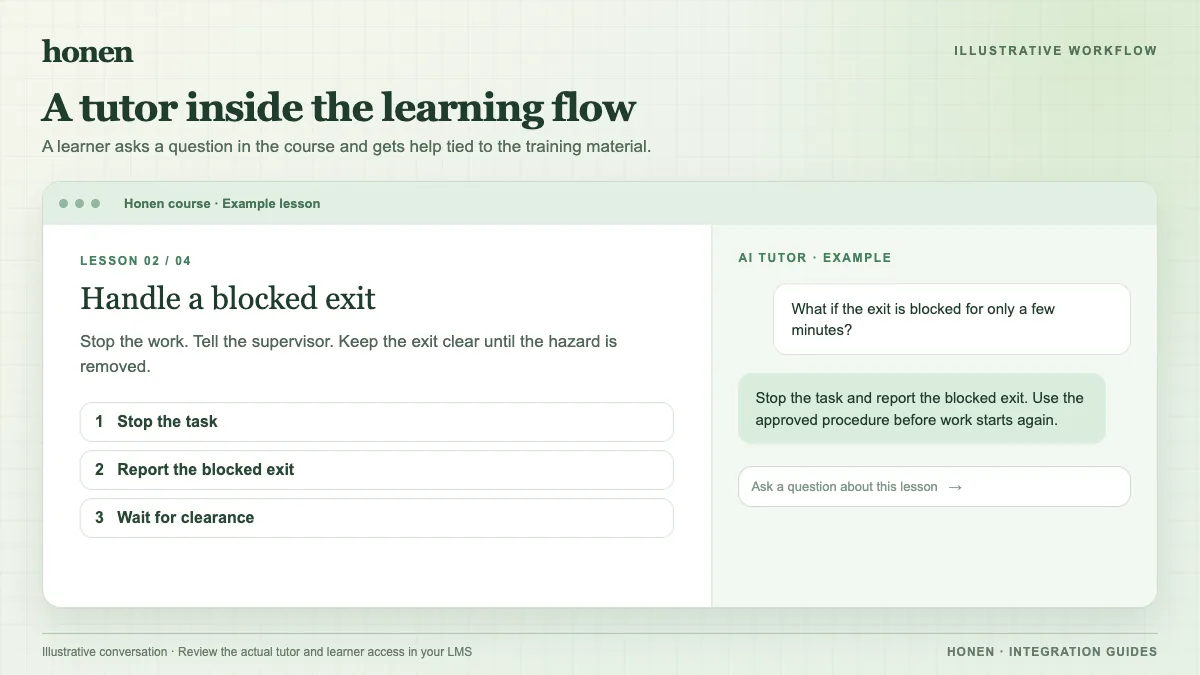
A static lesson can state a rule. A tutor can respond when a learner does not understand that rule. For example, a learner in a safety course asks, “Which switch do I set to OFF before I inspect the machine?” The tutor can refer to the course material and guide the learner to the correct part of the approved procedure.
Keep the tutor within the course's source material and instructions. Ask a subject expert to test likely questions, unsafe requests, and ambiguous terms before you release the course. The tutor supports instruction; it does not approve a learner's work or replace required supervision.
How the learner reaches it
- Create the course and its tutor in Honen.
- Export a SCORM package for the course.
- Upload the ZIP through Cornerstone's documented Content Uploader flow.
- Assign the course to a test learner and open it from Cornerstone.
The SCORM launch gives the learner access to the Honen course without a separate Honen sign-in. The course can run in the Cornerstone launch frame. Confirm the frame and browser policy in your tenant. Honen needs network access during learning because the SCORM ZIP loads the live course.
Write tutor source material clearly
Give the tutor approved words and clear limits. Use one term for each object. Put one instruction in each step. If a procedure says “valve” in one place and “tap” in another, decide which term is correct before publication. Honen can help draft and review text that uses controlled-language practices from ASD-STE100. A qualified editor must check the full standard and domain vocabulary; the tutor does not certify conformity.
What an administrator can check
Check the lesson, tutor responses, and learner progress in Honen. Check the assigned training result in Cornerstone. The SCORM runtime can write completion, pass or fail, score, time, and resume data according to policy while the learner has the course open. The tutor conversation is not a new Cornerstone grade field.
For setup and limits, return to Honen with Cornerstone. For a broader choice of paths, read how to add an AI tutor to an existing LMS.
Related guides
Build with Honen
Create a course from your source material. Review the content. Deliver it through your LMS.
Book a demo