AI tutor for Moodle courses
Honen's tutor runs with the Honen course that a learner opens from Moodle. The course can launch as an LTI 1.3 external tool or a SCORM 1.2 activity. Start with the Honen and Moodle integration to select a route.
Give learners help at the point of need
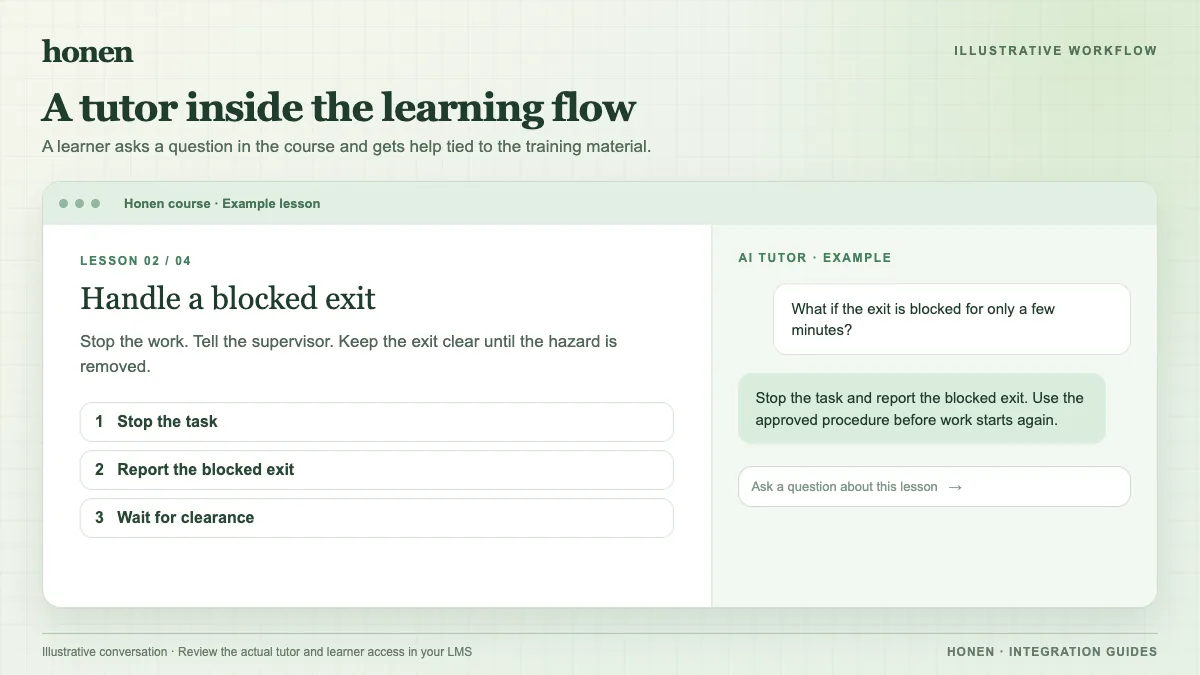
A page can define a concept. A tutor can help a learner apply it to a question. In a lab safety course, a learner might ask, “What do I do if the indicator stays red?” The answer must follow the approved procedure. Test that question, its likely variations, and the tutor's response before you assign the course.
Keep source and review under control
- Supply current, approved source files.
- Remove superseded instructions.
- Check sample tutor answers against the source.
- Revise vague instructions into short, active steps.
- Have a qualified editor check the approved dictionary, ASD-STE100 rules, and domain terms when controlled language is required.
Honen helps draft and review technical prose. It cannot certify ASD-STE100 conformance or replace a subject expert.
Choose the learner launch
Moodle can display an LTI external tool inside a course activity, depending on its launch and browser settings. LTI can avoid a separate learner login and can return grades when the service and privacy settings allow it. Test the actual learner view in your site.
A SCORM 1.2 package can also launch the full Honen course and tutor. Moodle documents the SCORM activity route. Its tracking connection sends completion, pass/fail, score, time, and resume data while the course is open. Do not expect the full tutor conversation to appear in Moodle reports.
Next step
Review Honen with Moodle and how to add an AI tutor to an existing LMS.
Related guides
Build with Honen
Create a course from your source material. Review the content. Deliver it through your LMS.
Book a demo