AI tutor for Docebo courses: support learners in the lesson
Honen can include an AI tutor in the course that a learner launches from Docebo. The tutor can answer questions about course material while the learner studies. Build the course in Honen and deliver it through a supported Docebo path. See Honen for Docebo.
Design the tutor around a task
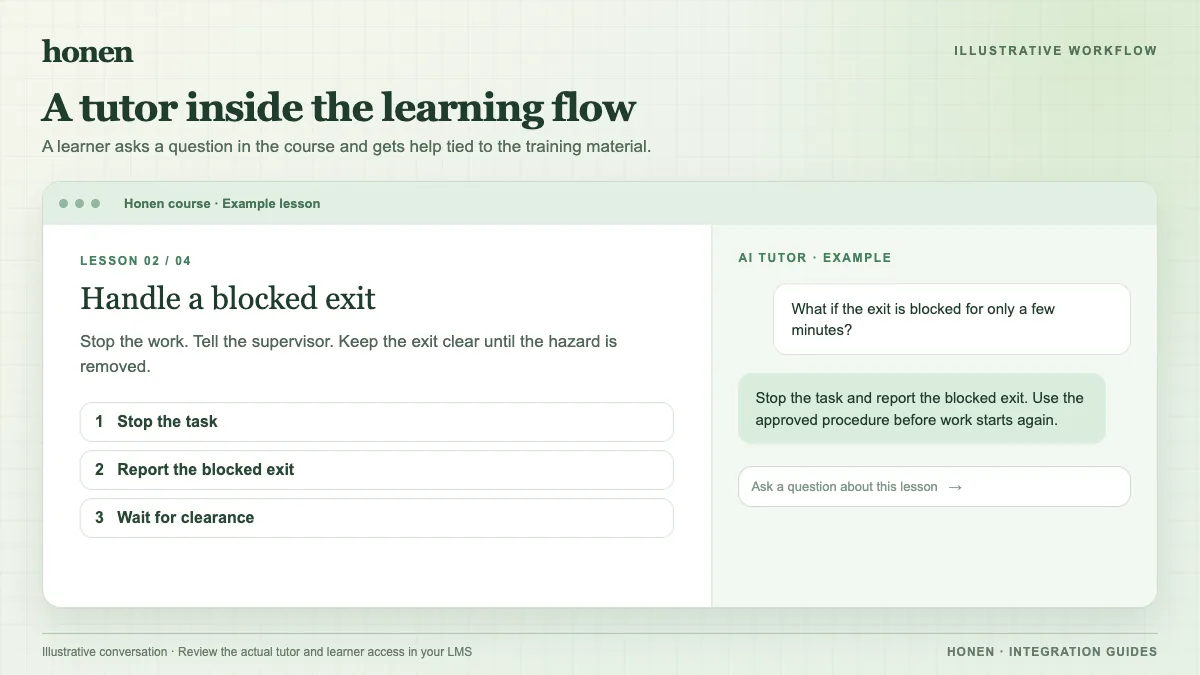
Give the tutor approved course material. State what it can explain and what it must send to a human expert. For a safety course, for example, the tutor can ask the learner to identify a hazard and explain the rule in the approved procedure. It should not invent a new procedure or decide a real incident response.
Test these questions before launch:
- Can the tutor find the current approved answer?
- Does it state when the source is silent?
- Does it use approved terms?
- Does it direct the learner to a responsible person when needed?
Write the course and tutor source in short, active sentences. Put one action in each instruction. A qualified editor must check the language against your dictionary and applicable ASD-STE100 rules. Honen can help draft controlled language. It cannot certify a level of conformity.
Choose a Docebo delivery path
For most teams, SCORM gives a documented package path. Docebo supports SCORM 1.2 and 2004 3rd Edition. Use a Honen SCORM 1.2 package because its 2004 export is 4th Edition, while Docebo documents 3rd Edition. The Honen course, including its tutor, loads from Honen when the learner opens the package. Test cookies and the launch view on the target browsers.
Docebo also supports basic LTI 1.3 training material. Its help page says Deep Linking is not supported. Confirm the launch and score path in your tenant before you use LTI.
Check what Docebo records
The tutor conversation is part of the Honen learning experience. Do not assume it appears in a Docebo report. With SCORM, Docebo receives the status and score that the package sends while the course is open. Ask a test learner to finish and close the lesson, then inspect the Docebo course report.
Read how to add an AI tutor to an existing LMS. Return to the Docebo integration page to plan the rollout.
Related guides
Build with Honen
Create a course from your source material. Review the content. Deliver it through your LMS.
Book a demo